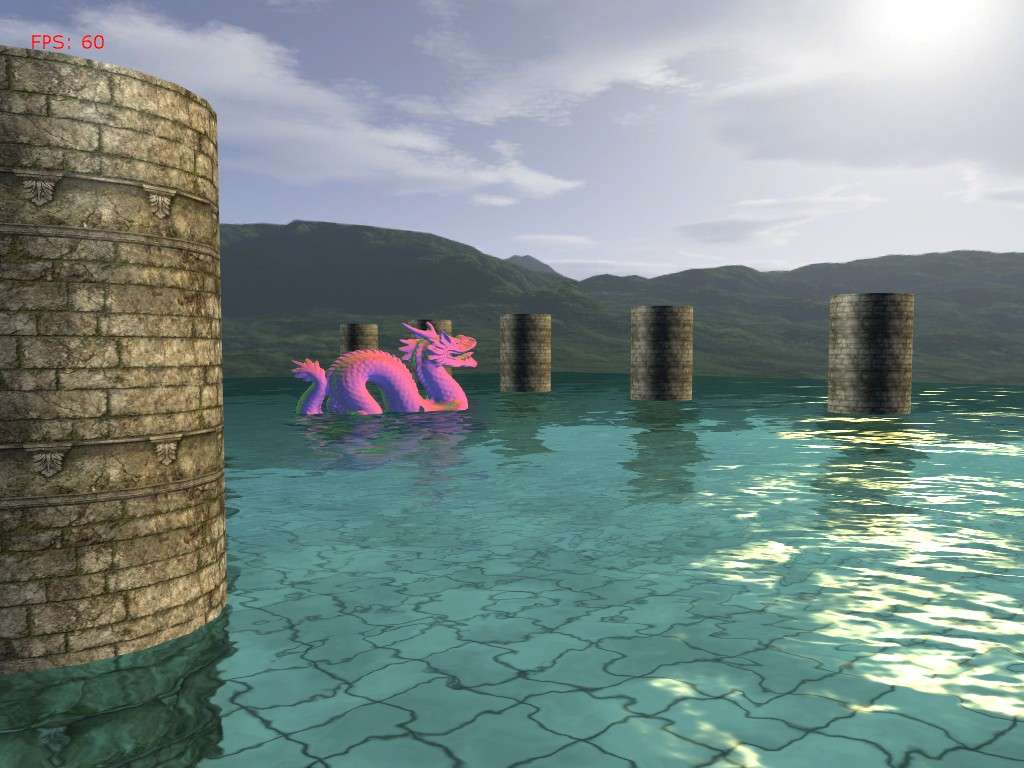
I had some requests awhile back for a more independent water effect that I had provided in my camera animation tutorials. And just the other day I remembered that I had totally forgot about this (doh!). So here is a DrawableGameComponent for the water effect. Have a look here to see it in action.
To setup the component we need to fill out a WaterOptions object that will be passed to the water component.
WaterOptions options = new WaterOptions();
options.Width = 257;
options.Height = 257;
options.CellSpacing = 0.5f;
options.WaveMapAsset0 = "Textures/wave0";
options.WaveMapAsset1 = "Textures/wave1";
options.WaveMapVelocity0 = new Vector2(0.01f, 0.03f);
options.WaveMapVelocity1 = new Vector2(-0.01f, 0.03f);
options.WaveMapScale = 2.5f;
options.WaterColor = new Vector4(0.5f, 0.79f, 0.75f, 1.0f);
options.SunColor = new Vector4(1.0f, 0.8f, 0.4f, 1.0f);
options.SunDirection = new Vector3(2.6f, -1.0f, -1.5f);
options.SunFactor = 1.5f;
options.SunPower = 250.0f;

mWaterMesh = new Water(this);
mWaterMesh.Options = options;
mWaterMesh.EffectAsset = "Shaders/Water";
mWaterMesh.World = Matrix.CreateTranslation(Vector3.UnitY * 2.0f);
mWaterMesh.RenderObjects = DrawObjects;
So here will fill out various options such as width and height, cell spacing, the normal map asset names, etc. We then create the water component, and assign it the options object. We then provide the filename of the Water.fx shader, the water's position and we then assign its RenderObjects delegate a function that will be used to draw the objects in your scene.
The component tries to be relatively independent of how your represent your game objects. All that it asks for is that you provide a function that takes a reflection matrix. This function should go through the objects that you want to be reflected/refracted and combine the reflection matrix with the object's world matrix.
Here's an example of what your DrawObjects() function might look like.
private void DrawObjects(Matrix reflMatrix)
{
   foreach (DrawableGameComponent mesh in Components)
{
  Matrix oldWorld = mesh.World;
  mesh.World = oldWorld * reflMatrix;

  mesh.Draw(mGameTime);

  mesh.World = oldWorld;
}
}
mWaterMesh.RenderObjects is the delegate that has the signature of:
public delegate void RenderObjects(
Matrix reflectionMatrix);
Basically this function should just go through your game objects and render them.
Lastly, before you draw your objects in the scene, you need to send to the water component the ViewProjection matrix and the camera's position by using WaterMesh.SetCamera(). And you need to call WaterMesh.UpdateWaterMaps() to update the reflection and refraction maps. After this, you can clear your framebuffer and draw your objects. For how this effect looks you can take a look at my camera animation tutorials.
Water GameComponent:using System;
using System.Collections.Generic;
using System.Text;
using Microsoft.Xna.Framework;
using Microsoft.Xna.Framework.Graphics;
using Microsoft.Xna.Framework.Content;
namespace WaterSample
{
//delegate that the water component to call to render the objects in the scene
public delegate void RenderObjects(Matrix reflectionMatrix);
/// <summary>
/// Options that must be passed to the water component before Initialization
/// </summary>
public class WaterOptions
{
//width and height must be of the form 2^n + 1
public int Width = 257;
public int Height = 257;
public float CellSpacing = .5f;
public float WaveMapScale = 1.0f;
public int RenderTargetSize = 512;
//offsets for the texcoords of the wave maps updated every frame
public Vector2 WaveMapOffset0;
public Vector2 WaveMapOffset1;
//the direction to offset the texcoords of the wave maps
public Vector2 WaveMapVelocity0;
public Vector2 WaveMapVelocity1;
//asset names for the normal/wave maps
public string WaveMapAsset0;
public string WaveMapAsset1;
public Vector4 WaterColor;
public Vector4 SunColor;
public Vector3 SunDirection;
public float SunFactor;
public float SunPower;
}
/// <summary>
/// Drawable game component for water rendering. Renders the scene to reflection and refraction
/// maps that are projected onto the water plane and are distorted based on two scrolling normal
/// maps.
/// </summary>
public class Water : DrawableGameComponent
{
#region Fields
private RenderObjects mDrawFunc;
//vertex and index buffers for the water plane
private VertexBuffer mVertexBuffer;
private IndexBuffer mIndexBuffer;
private VertexDeclaration mDecl;
//water shader
private Effect mEffect;
private string mEffectAsset;
//camera properties
private Vector3 mViewPos;
private Matrix mViewProj;
private Matrix mWorld;
//maps to render the refraction/reflection to
private RenderTarget2D mRefractionMap;
private RenderTarget2D mReflectionMap;
//scrolling normal maps that we will use as a
//a normal for the water plane in the shader
private Texture mWaveMap0;
private Texture mWaveMap1;
//user specified options to configure the water object
private WaterOptions mOptions;
//tells the water object if it needs to update the refraction
//map itself or not. Since refraction just needs the scene drawn
//regularly, we can:
// --Draw the objects we want refracted
// --Resolve the back buffer and send it to the water
// --Skip computing the refraction map in the water object
private bool mGrabRefractionFromFB = false;
private int mNumVertices;
private int mNumTris;
#endregion
#region Properties
public RenderObjects RenderObjects
{
set { mDrawFunc = value; }
}
/// <summary>
/// Name of the asset for the Effect.
/// </summary>
public string EffectAsset
{
get { return mEffectAsset; }
set { mEffectAsset = value; }
}
/// <summary>
/// The render target that the refraction is rendered to.
/// </summary>
public RenderTarget2D RefractionMap
{
get { return mRefractionMap; }
set { mRefractionMap = value; }
}
/// <summary>
/// The render target that the reflection is rendered to.
/// </summary>
public RenderTarget2D ReflectionMap
{
get { return mReflectionMap; }
set { mReflectionMap = value; }
}
/// <summary>
/// Options to configure the water. Must be set before
/// the water is initialized. Should be set immediately
/// following the instantiation of the object.
/// </summary>
public WaterOptions Options
{
get { return mOptions; }
set { mOptions = value; }
}
/// <summary>
/// The world matrix of the water.
/// </summary>
public Matrix World
{
get { return mWorld; }
set { mWorld = value; }
}
#endregion
public Water(Game game) : base(game)
{
}
public override void Initialize()
{
base.Initialize();
//build the water mesh
mNumVertices = mOptions.Width * mOptions.Height;
mNumTris = (mOptions.Width - 1) * (mOptions.Height - 1) * 2;
VertexPositionTexture[] vertices = new VertexPositionTexture[mNumVertices];
Vector3[] verts;
int[] indices;
GenTriGrid(mOptions.Height, mOptions.Width, mOptions.CellSpacing, mOptions.CellSpacing,
Vector3.Zero, out verts, out indices);
//copy the verts into our PositionTextured array
for (int i = 0; i < mOptions.Width; ++i)
{
for (int j = 0; j < mOptions.Height; ++j)
{
int index = i * mOptions.Width + j;
vertices[index].Position = verts[index];
vertices[index].TextureCoordinate = new Vector2((float)j / mOptions.Width, (float)i / mOptions.Height);
}
}
mVertexBuffer = new VertexBuffer(Game.GraphicsDevice,
VertexPositionTexture.SizeInBytes * mOptions.Width * mOptions.Height,
BufferUsage.WriteOnly);
mVertexBuffer.SetData(vertices);
mIndexBuffer = new IndexBuffer(Game.GraphicsDevice, typeof(int), indices.Length, BufferUsage.WriteOnly);
mIndexBuffer.SetData(indices);
mDecl = new VertexDeclaration(Game.GraphicsDevice, VertexPositionTexture.VertexElements);
}
protected override void LoadContent()
{
base.LoadContent();
mWaveMap0 = Game.Content.Load<Texture2D>(mOptions.WaveMapAsset0);
mWaveMap1 = Game.Content.Load<Texture2D>(mOptions.WaveMapAsset1);
PresentationParameters pp = Game.GraphicsDevice.PresentationParameters;
SurfaceFormat format = pp.BackBufferFormat;
MultiSampleType msType = pp.MultiSampleType;
int msQuality = pp.MultiSampleQuality;
mRefractionMap = new RenderTarget2D(Game.GraphicsDevice, mOptions.RenderTargetSize, mOptions.RenderTargetSize,
1, format, msType, msQuality);
mReflectionMap = new RenderTarget2D(Game.GraphicsDevice, mOptions.RenderTargetSize, mOptions.RenderTargetSize,
1, format, msType, msQuality);
mEffect = Game.Content.Load<Effect>(mEffectAsset);
//set the parameters that shouldn't change.
//Some of these might need to change every once in awhile,
//move them to updateEffectParams if you need that functionality.
if (mEffect != null)
{
mEffect.Parameters["WaveMap0"].SetValue(mWaveMap0);
mEffect.Parameters["WaveMap1"].SetValue(mWaveMap1);
mEffect.Parameters["TexScale"].SetValue(mOptions.WaveMapScale);
mEffect.Parameters["WaterColor"].SetValue(mOptions.WaterColor);
mEffect.Parameters["SunColor"].SetValue(mOptions.SunColor);
mEffect.Parameters["SunDirection"].SetValue(mOptions.SunDirection);
mEffect.Parameters["SunFactor"].SetValue(mOptions.SunFactor);
mEffect.Parameters["SunPower"].SetValue(mOptions.SunPower);
mEffect.Parameters["World"].SetValue(mWorld);
}
}
public override void Update(GameTime gameTime)
{
float timeDelta = (float)gameTime.ElapsedGameTime.TotalSeconds;
mOptions.WaveMapOffset0 += mOptions.WaveMapVelocity0 * timeDelta;
mOptions.WaveMapOffset1 += mOptions.WaveMapVelocity1 * timeDelta;
if (mOptions.WaveMapOffset0.X >= 1.0f mOptions.WaveMapOffset0.X <= -1.0f)
mOptions.WaveMapOffset0.X = 0.0f;
if (mOptions.WaveMapOffset1.X >= 1.0f mOptions.WaveMapOffset1.X <= -1.0f)
mOptions.WaveMapOffset1.X = 0.0f;
if (mOptions.WaveMapOffset0.Y >= 1.0f mOptions.WaveMapOffset0.Y <= -1.0f)
mOptions.WaveMapOffset0.Y = 0.0f;
if (mOptions.WaveMapOffset1.Y >= 1.0f mOptions.WaveMapOffset1.Y <= -1.0f)
mOptions.WaveMapOffset1.Y = 0.0f;
}
public override void Draw(GameTime gameTime)
{
UpdateEffectParams();
Game.GraphicsDevice.Indices = mIndexBuffer;
Game.GraphicsDevice.Vertices[0].SetSource(mVertexBuffer, 0, VertexPositionTexture.SizeInBytes);
Game.GraphicsDevice.VertexDeclaration = mDecl;
mEffect.Begin(SaveStateMode.None);
foreach (EffectPass pass in mEffect.CurrentTechnique.Passes)
{
pass.Begin();
Game.GraphicsDevice.DrawIndexedPrimitives(PrimitiveType.TriangleList, 0, 0, mNumVertices, 0, mNumTris);
pass.End();
}
mEffect.End();
}
/// <summary>
/// Set the ViewProjection matrix and position of the Camera.
/// </summary>
/// <param name="viewProj"></param>
/// <param name="pos"></param>
public void SetCamera(Matrix viewProj, Vector3 pos)
{
mViewProj = viewProj;
mViewPos = pos;
}
/// <summary>
/// Updates the reflection and refraction maps. Called
/// on update.
/// </summary>
/// <param name="gameTime"></param>
public void UpdateWaterMaps(GameTime gameTime)
{
/*------------------------------------------------------------------------------------------
* Render to the Reflection Map
*/
//clip objects below the water line, and render the scene upside down
GraphicsDevice.RenderState.CullMode = CullMode.CullClockwiseFace;
GraphicsDevice.SetRenderTarget(0, mReflectionMap);
GraphicsDevice.Clear(ClearOptions.Target ClearOptions.DepthBuffer, mOptions.WaterColor, 1.0f, 0);
//reflection plane in local space
Vector4 waterPlaneL = new Vector4(0.0f, -1.0f, 0.0f, 0.0f);
Matrix wInvTrans = Matrix.Invert(mWorld);
wInvTrans = Matrix.Transpose(wInvTrans);
//reflection plane in world space
Vector4 waterPlaneW = Vector4.Transform(waterPlaneL, wInvTrans);
Matrix wvpInvTrans = Matrix.Invert(mWorld * mViewProj);
wvpInvTrans = Matrix.Transpose(wvpInvTrans);
//reflection plane in homogeneous space
Vector4 waterPlaneH = Vector4.Transform(waterPlaneL, wvpInvTrans);
GraphicsDevice.ClipPlanes[0].IsEnabled = true;
GraphicsDevice.ClipPlanes[0].Plane = new Plane(waterPlaneH);
Matrix reflectionMatrix = Matrix.CreateReflection(new Plane(waterPlaneW));
if (mDrawFunc != null)
mDrawFunc(reflectionMatrix);
GraphicsDevice.RenderState.CullMode = CullMode.CullCounterClockwiseFace;
GraphicsDevice.SetRenderTarget(0, null);
/*------------------------------------------------------------------------------------------
* Render to the Refraction Map
*/
//if the application is going to send us the refraction map
//exit early. The refraction map must be given to the water component
//before it renders
if (mGrabRefractionFromFB)
{
GraphicsDevice.ClipPlanes[0].IsEnabled = false;
return;
}
//update the refraction map, clip objects above the water line
//so we don't get artifacts
GraphicsDevice.SetRenderTarget(0, mRefractionMap);
GraphicsDevice.Clear(ClearOptions.Target ClearOptions.DepthBuffer, mOptions.WaterColor, 1.0f, 1);
//reflection plane in local space
waterPlaneL.W = 2.5f;
//if we're below the water line, don't perform clipping.
//this allows us to see the distorted objects from under the water
if (mViewPos.Y < mWorld.Translation.Y)
{
GraphicsDevice.ClipPlanes[0].IsEnabled = false;
}
if (mDrawFunc != null)
mDrawFunc(Matrix.Identity);
GraphicsDevice.ClipPlanes[0].IsEnabled = false;
GraphicsDevice.SetRenderTarget(0, null);
}
/// <summary>
/// Updates effect parameters related to the water shader
/// </summary>
private void UpdateEffectParams()
{
//update the reflection and refraction textures
mEffect.Parameters["ReflectMap"].SetValue(mReflectionMap.GetTexture());
mEffect.Parameters["RefractMap"].SetValue(mRefractionMap.GetTexture());
//normal map offsets
mEffect.Parameters["WaveMapOffset0"].SetValue(mOptions.WaveMapOffset0);
mEffect.Parameters["WaveMapOffset1"].SetValue(mOptions.WaveMapOffset1);
mEffect.Parameters["WorldViewProj"].SetValue(mWorld * mViewProj);
mEffect.Parameters["EyePos"].SetValue(mViewPos);
}
/// <summary>
/// Generates a grid of vertices to use for the water plane.
/// </summary>
/// <param name="numVertRows">Number of rows. Must be 2^n + 1. Ex. 129, 257, 513.</param>
/// <param name="numVertCols">Number of columns. Must be 2^n + 1. Ex. 129, 257, 513.</param>
/// <param name="dx">Cell spacing in the x dimension.</param>
/// <param name="dz">Cell spacing in the y dimension.</param>
/// <param name="center">Center of the plane.</param>
/// <param name="verts">Outputs the constructed vertices for the plane.</param>
/// <param name="indices">Outpus the constructed triangle indices for the plane.</param>
private void GenTriGrid(int numVertRows, int numVertCols, float dx, float dz,
Vector3 center, out Vector3[] verts, out int[] indices)
{
int numVertices = numVertRows * numVertCols;
int numCellRows = numVertRows - 1;
int numCellCols = numVertCols - 1;
int mNumTris = numCellRows * numCellCols * 2;
float width = (float)numCellCols * dx;
float depth = (float)numCellRows * dz;
//===========================================
// Build vertices.
// We first build the grid geometry centered about the origin and on
// the xz-plane, row-by-row and in a top-down fashion. We then translate
// the grid vertices so that they are centered about the specified
// parameter 'center'.
//verts.resize(numVertices);
verts = new Vector3[numVertices];
// Offsets to translate grid from quadrant 4 to center of
// coordinate system.
float xOffset = -width * 0.5f;
float zOffset = depth * 0.5f;
int k = 0;
for (float i = 0; i < numVertRows; ++i)
{
for (float j = 0; j < numVertCols; ++j)
{
// Negate the depth coordinate to put in quadrant four.
// Then offset to center about coordinate system.
verts[k] = new Vector3(0, 0, 0);
verts[k].X = j * dx + xOffset;
verts[k].Z = -i * dz + zOffset;
verts[k].Y = 0.0f;
Matrix translation = Matrix.CreateTranslation(center);
verts[k] = Vector3.Transform(verts[k], translation);
++k; // Next vertex
}
}
//===========================================
// Build indices.
//indices.resize(mNumTris * 3);
indices = new int[mNumTris * 3];
// Generate indices for each quad.
k = 0;
for (int i = 0; i < numCellRows; ++i)
{
for (int j = 0; j < numCellCols; ++j)
{
indices[k] = i * numVertCols + j;
indices[k + 1] = i * numVertCols + j + 1;
indices[k + 2] = (i + 1) * numVertCols + j;
indices[k + 3] = (i + 1) * numVertCols + j;
indices[k + 4] = i * numVertCols + j + 1;
indices[k + 5] = (i + 1) * numVertCols + j + 1;
// next quad
k += 6;
}
}
}
}
}
Water.fx shader://Water effect shader that uses reflection and refraction maps projected onto the water.
//These maps are distorted based on the two scrolling normal maps.
float4x4 World;
float4x4 WorldViewProj;
float4 WaterColor;
float3 SunDirection;
float4 SunColor;
float SunFactor; //the intensity of the sun specular term.
float SunPower; //how shiny we want the sun specular term on the water to be.
float3 EyePos;
// Texture coordinate offset vectors for scrolling
// normal maps.
float2 WaveMapOffset0;
float2 WaveMapOffset1;
// Two normal maps and the reflection/refraction maps
texture WaveMap0;
texture WaveMap1;
texture ReflectMap;
texture RefractMap;
//scale used on the wave maps
float TexScale;
static const float R0 = 0.02037f;
sampler WaveMapS0 = sampler_state
{
Texture = <WaveMap0>;
MinFilter = LINEAR;
MagFilter = LINEAR;
MipFilter = LINEAR;
AddressU = WRAP;
AddressV = WRAP;
};
sampler WaveMapS1 = sampler_state
{
Texture = <WaveMap1>;
MinFilter = LINEAR;
MagFilter = LINEAR;
MipFilter = LINEAR;
AddressU = WRAP;
AddressV = WRAP;
};
sampler ReflectMapS = sampler_state
{
Texture = <ReflectMap>;
MinFilter = LINEAR;
MagFilter = LINEAR;
MipFilter = LINEAR;
AddressU = CLAMP;
AddressV = CLAMP;
};
sampler RefractMapS = sampler_state
{
Texture = <RefractMap>;
MinFilter = LINEAR;
MagFilter = LINEAR;
MipFilter = LINEAR;
AddressU = CLAMP;
AddressV = CLAMP;
};
struct OutputVS
{
float4 posH : POSITION0;
float3 toEyeW : TEXCOORD0;
float2 tex0 : TEXCOORD1;
float2 tex1 : TEXCOORD2;
float4 projTexC : TEXCOORD3;
float4 pos : TEXCOORD4;
};
OutputVS WaterVS( float3 posL : POSITION0,
float2 texC : TEXCOORD0)
{
// Zero out our output.
OutputVS outVS = (OutputVS)0;
// Transform vertex position to world space.
float3 posW = mul(float4(posL, 1.0f), World).xyz;
outVS.pos.xyz = posW;
outVS.pos.w = 1.0f;
// Compute the unit vector from the vertex to the eye.
outVS.toEyeW = posW - EyePos;
// Transform to homogeneous clip space.
outVS.posH = mul(float4(posL, 1.0f), WorldViewProj);
// Scroll texture coordinates.
outVS.tex0 = (texC * TexScale) + WaveMapOffset0;
outVS.tex1 = (texC * TexScale) + WaveMapOffset1;
// Generate projective texture coordinates from camera's perspective.
outVS.projTexC = outVS.posH;
// Done--return the output.
return outVS;
}
float4 WaterPS( float3 toEyeW : TEXCOORD0,
float2 tex0 : TEXCOORD1,
float2 tex1 : TEXCOORD2,
float4 projTexC : TEXCOORD3,
float4 pos : TEXCOORD4) : COLOR
{
projTexC.xyz /= projTexC.w;
projTexC.x = 0.5f*projTexC.x + 0.5f;
projTexC.y = -0.5f*projTexC.y + 0.5f;
projTexC.z = .1f / projTexC.z;
toEyeW = normalize(toEyeW);
SunDirection = normalize(SunDirection);
// Light vector is opposite the direction of the light.
float3 lightVecW = -SunDirection;
// Sample normal map.
float3 normalT0 = tex2D(WaveMapS0, tex0);
float3 normalT1 = tex2D(WaveMapS1, tex1);
//unroll the normals retrieved from the normalmaps
normalT0.yz = normalT0.zy;
normalT1.yz = normalT1.zy;
normalT0 = 2.0f*normalT0 - 1.0f;
normalT1 = 2.0f*normalT1 - 1.0f;
float3 normalT = normalize(0.5f*(normalT0 + normalT1));
float3 n1 = float3(0,1,0); //we'll just use the y unit vector for spec reflection.
//get the reflection vector from the eye
float3 R = normalize(reflect(toEyeW,normalT));
float4 finalColor;
finalColor.a = 1;
//compute the fresnel term to blend reflection and refraction maps
float ang = saturate(dot(-toEyeW,n1));
float f = R0 + (1.0f-R0) * pow(1.0f-ang,5.0);
//also blend based on distance
f = min(1.0f, f + 0.007f * EyePos.y);
//compute the reflection from sunlight, hacked in color, should be a variable
float sunFactor = SunFactor;
float sunPower = SunPower;
if(EyePos.y < pos.y)
{
sunFactor = 7.0f; //these could also be sent to the shader
sunPower = 55.0f;
}
float3 sunlight = sunFactor * pow(saturate(dot(R, lightVecW)), sunPower) * SunColor;
float4 refl = tex2D(ReflectMapS, projTexC.xy + projTexC.z * normalT.xz);
float4 refr = tex2D(RefractMapS, projTexC.xy - projTexC.z * normalT.xz);
//only use the refraction map if we're under water
if(EyePos.y < pos.y)
f = 0.0f;
//interpolate the reflection and refraction maps based on the fresnel term and add the sunlight
finalColor.rgb = WaterColor * lerp( refr, refl, f) + sunlight;
return finalColor;
}
technique WaterTech
{
pass Pass1
{
// Specify the vertex and pixel shader associated with this pass.
vertexShader = compile vs_2_0 WaterVS();
pixelShader = compile ps_2_0 WaterPS();
CullMode = None;
}
}
Edit: A demo of the water component is now available.